Markup2FormattedText
I work with AI a lot, and the answers come back as Markdown.
That is fine while I am still reading. Headings, lists, a table, some bold.
The moment I want to hand the same text on, usually in an email, it falls apart. Paste it into Mail and the other person gets the raw marks: hashes, asterisks, pipes.
So I went looking for a tool that would turn that Markdown into normal formatted text.
What I found was never quite the thing. Some apps did far too much. Some did the wrong job entirely and wanted to build me a PDF or a Word document.
The rest were Python scripts and terminal installs, which is a lot of machinery for “I just want to paste this into a mail”.
What I actually wanted was narrow.
Markdown is already on the clipboard.
Turn it into formatted text, put that back on the clipboard, and let me paste it wherever I was going.
No editor. No export dialog. No second app to learn.
So I built Markup2FormattedText.
The idea
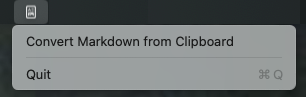
It sits in the menu bar. I copy the answer, click the one command, and paste. Mail, Pages, or Word pick up the formatting. A plain-text field still gets readable text.
That is basically the whole app.
How I use it
The usual loop is short. I ask for a checklist, a short explanation, a table of what is required and what is optional. The reply arrives as Markdown.
Copy, click, paste into the mail. The menu bar symbol flips to a checkmark for a moment, so I know the clipboard is ready.
A few things mattered once I used it on real replies, and I kept them small on purpose:
– Headings, bold, italic, lists, quotes, links, and code come through as formatting, not as leftover characters – Tables stay tables, and the text after a table stays normal text – One command. Nothing to configure – It lives in the menu bar. No Dock icon
macOS does not ask for any special permission. The app only reads and writes the clipboard, and everything stays on this Mac.
I stopped once that paste worked. The point was to get the AI’s Markdown into an email without adopting another toolbox.
If you want to try it: Download it here.