
Just before Christmas, a client requested a report for a simple time tracking system.
The requirements were:
- Monthly overview of employee hours
- Summaries of hours worked
- Employees have different target hours each month
- Each employee may have a certain amount of overtime that is included in the base salary. Overtime only applies after this limit is exceeded.
- There is only one table for entering work hours, sick days, vacation days, and compensatory time off, and there is only a fixed number of categories for hours.
I’ve programmed such reports many times before, and it usually ends up being a spaghetti mess of relationships for the days of a month to display them in portals, or you end up bending virtual lists so much that it becomes painful to implement further customer requests.
So, this time, I wanted to use an HTML approach for the display.
This approach makes sense here because we don’t need to write any data from the HTML back into FileMaker, and HTML display is still much more flexible than rendering such solutions in FileMaker.
Once again, I turned to what’s called Vibe Coding with an AI.
I’ve been using CURSOR AI for a while now, and I’m always quite happy with the results.
I like CURSOR AI not only because of its models specifically trained for programming but also because, in addition to an “Agent” mode, there is also a “Plan” mode, where the program doesn’t immediately start coding once you submit a prompt.
What I find particularly fascinating is that you can upload screenshots that make errors or desired changes visually accessible to the AI.
As with every Vibe Coding project, the following applies:
How good is the training material for the technology used to solve the problem? In other words, is the technology well represented in the AI’s training material?
Is the problem a manageable and clearly defined topic?
Can the desired solution be described in clearly defined prompts?
All of these points can certainly be answered with a “Yes” for this problem, and here’s a piece of advice when entering prompts:
It’s always a good idea to fully describe the entire problem to the AI before you start programming. The better and more detailed you describe what’s desired, the more likely you’ll get the desired result.
Requesting features one after another is possible, but it carries the same risks as with human programmers:
You can only write a well-functioning and elegant solution if you know the “big picture.”
Otherwise, it quickly turns into patchwork or additional coding routines that cause strange side effects, making the code unstable and difficult to follow.
Of course, I never manage to get everything with a single comprehensive prompt in my Vibe Coding projects!
Believe me, I’ve seen many projects “die” from the so-called Feature Bloat!
In the end, you have a solution that is very difficult to manage for the programmer, and the user ends up frustrated because the interface is far too complicated.
However, our project turned out to be the perfect fit for the CURSOR AI.
So, I first described the approach and requirements to the AI:
- FileMaker database
- HTML solution
- Data transfer in a single JSON per month
- Display of holidays
- Monthly overview with totals
- Overtime included in the work hours
- Target hours for employees
The AI already delivered an almost perfect solution with the first HTML.
However, the data transfer still included daily data that the HTML needed to render the days.
With the next prompt, I requested that only the month and year be provided, and also a filter for the employees to be included.
My colleague made the absolutely correct point that the types of absences should actually be freely selectable, so that when this tool is used for a different client, the tool itself wouldn’t need to be changed.
So, we moved absences to their own table and also included a marker to indicate whether the absence type counts as work time (e.g., training).
The JSON for data transfer was neatly structured by the AI, making it easy to extend:
{
"entries" :
[
{
"date" : "19.12.2025",
"employee" : "Bansemer, Stephan",
"hours" : "8"
},
{
"date" : "16.12.2025",
"employee" : "Bansemer, Stephan",
"hours" : "2"
},
...
{
"date" : "20.12.2025",
"employee" : "Meier, Hans",
"hours" : "0"
},
{
"absenceType" : "Krankheit",
"countAsWorkTime" : false,
"date" : "22.12.2025",
"employee" : "Bansemer, Stephan",
"hours" : "4"
},
{
"absenceType" : "Zeitausgleich",
"countAsWorkTime" : false,
"date" : "23.12.2025",
"employee" : "Bansemer, Stephan",
"hours" : "8"
},
{
"absenceType" : "Zeitausgleich",
"countAsWorkTime" : false,
"date" : "16.12.2025",
"employee" : "Meier, Hans",
"hours" : "8"
}
],
"holidays" :
[
"29.03.2013",
"18.04.2014",
"03.04.2015",
...
"26.12.2024",
"26.12.2025",
"26.12.2026"
],
"month" : 12,
"employees" :
[
{
"employee" : "Bansemer, Stephan",
"includeOvertime" : 5,
"targetHours" : 10
},
{
"employee" : "Meier, Hans",
"includeOvertime" : 10,
"targetHours" : 12
},
{
"employee" : "Mustermann, Erika",
"includeOvertime" : 0,
"targetHours" : 15
}
],
"year" : 2025
}
As you can see, we simply pass all employee hours for a month (so only a relationship between month/year and the hours records in FileMaker).
In this array, the elements include the employee’s name and the total number of hours worked.
For absences, we also pass the “absenceType” and “countAsWorkTime” fields — the AI even suggested this as an optional parameter.
To allow the AI to automatically group hours by employees and create a filter for employees, there is an “employees” array.
Here, we pass the employees with their target hours “targetHours” and whether overtime is included “includeOvertime.”
Holidays are fetched via an SQL statement from a FileMaker table and are simply added to the JSON as the “holidays” array.
The month and year of the evaluation period are simple numbers at the top level of the JSON, and the HTML generates the days from them. This is done locally with a JavaScript routine, so no internet connection is required for the tool.
The navigation for the year and month was integrated directly into FileMaker, as we need to recreate the JSON data for the hours records each time the date changes. We use the selected month and year in the relationship to the hours records in FileMaker.
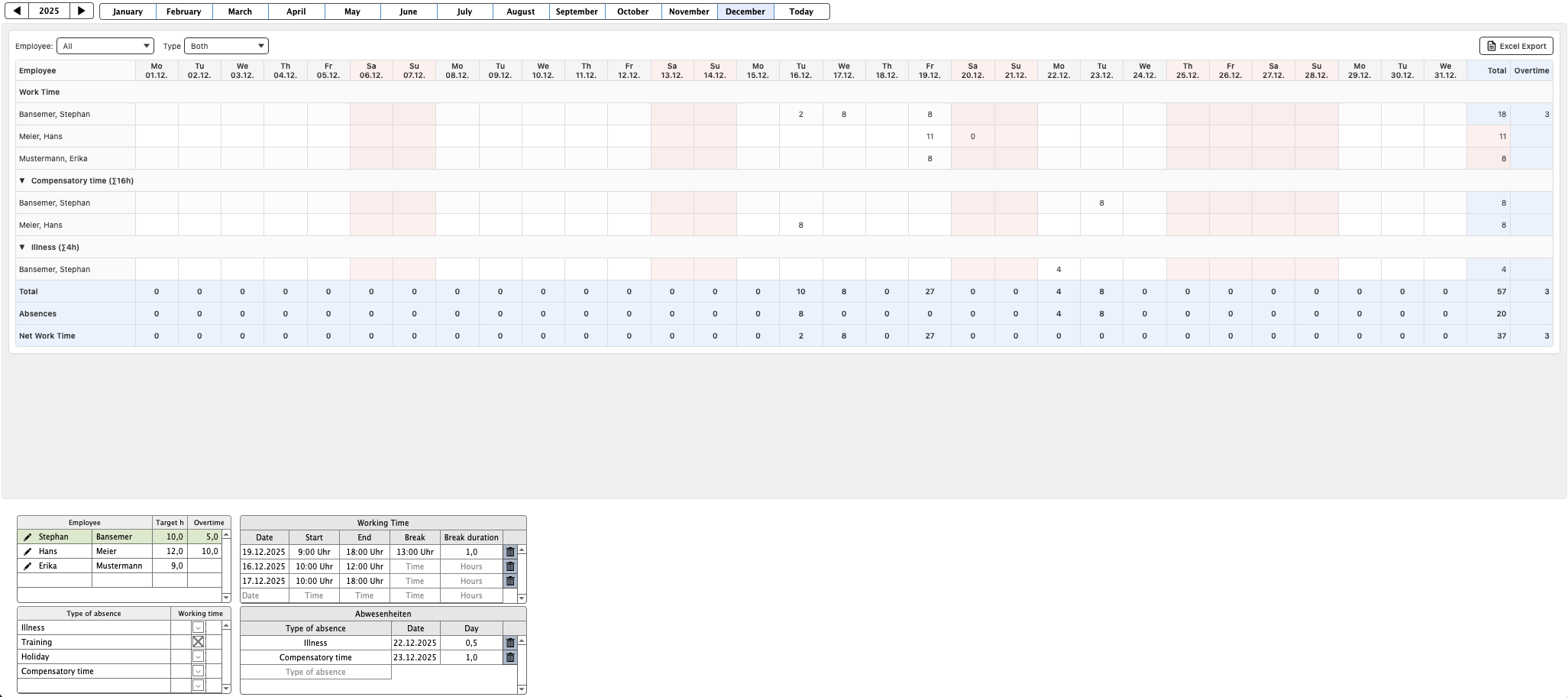
I’m especially pleased with how the AI handled the two filters for the employees and the toggle between work time plus absences or just work time or just absences. In the table display, without my intervention, the AI had the elegant idea of generating an expandable section for the absence types. Very smart solution, I think!
In the end, I had the AI create an Excel export of the table values. Unfortunately, the AI couldn’t create a usable solution, so I had the values copied to the clipboard from the HTML, so they could then be pasted into Excel or another program.
The last prompts were just small tweaks, like color changes for unachieved target hours and some cosmetic adjustments.
All in all, programming with the AI delivered a better result than I could have achieved with my HTML skills, and it did so in a fraction of the time I would have needed.
My conclusion remains the same after this Vibe Coding session:
- Well-described, clearly defined problems that can build on broad training material are solved very well by the AI.
- It’s surprising at times where you need to spend more time.
- Mainly, these are visual aspects, which is not surprising since the AI can never see the final visual result.
Some tips:
- After each code change, test all functions again. It has happened to me before that features that worked fine previously suddenly broke after expanding the code.
- It’s better to have a longer planning phase and a detailed first prompt with an explanation (it could also be a directory of documents and images, as the AI can read and consider those), rather than requesting each feature individually.
- Screenshots and logs created by the AI for itself help the AI “see” errors.
As always, if you have any questions, feel free to send me an email, and I’ll try to answer as soon as possible.